

Step: 1 AGP Assistant Support
First, let take a advantage of AGP upgrade Assistant for the migration, which will simply update the correct versions associated with newly available AGPs. Chose the latest version and use wizard to complete the processs
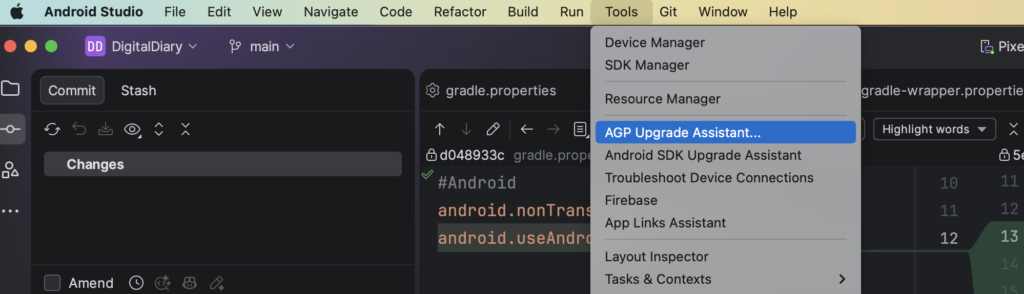
In the end, you would expected to see some changes in gradle.properites. We needs to work on enabling these flags properly later.
gradle.properites.
android.builtInKotlin=false
android.newDsl=false
gradle-wrapper.properties
//OLD
distributionUrl=https\://services.gradle.org/distributions/gradle-8.14.3-bin.zip
//NEW
distributionUrl=https\://services.gradle.org/distributions/gradle-9.3.1-bin.zip
libs.versions.toml
// OLD
[versions]
agp = "8.11.2"
//NEW
[versions]
agp = "9.0.0"
Feel free to use github copilot/gemini to update rest of the library versions in .toml file. But, it is optional.
Step 2. Set up the Android Gradle Library Plugin for KMP
Separate Android Module, if it’s not separated before
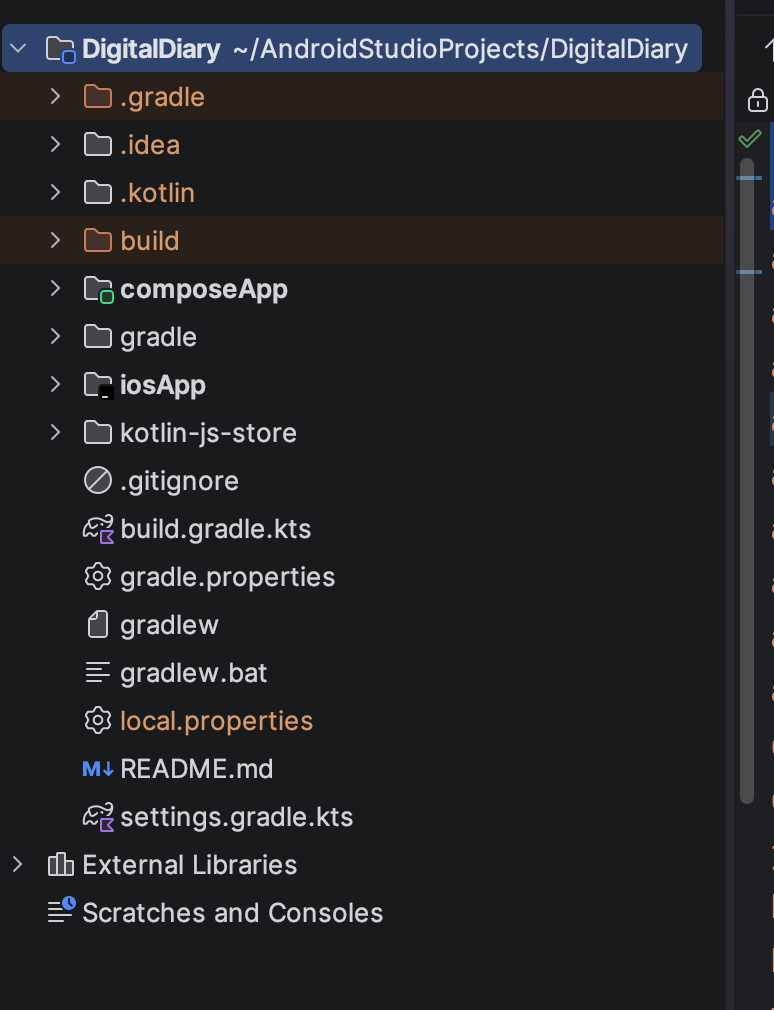
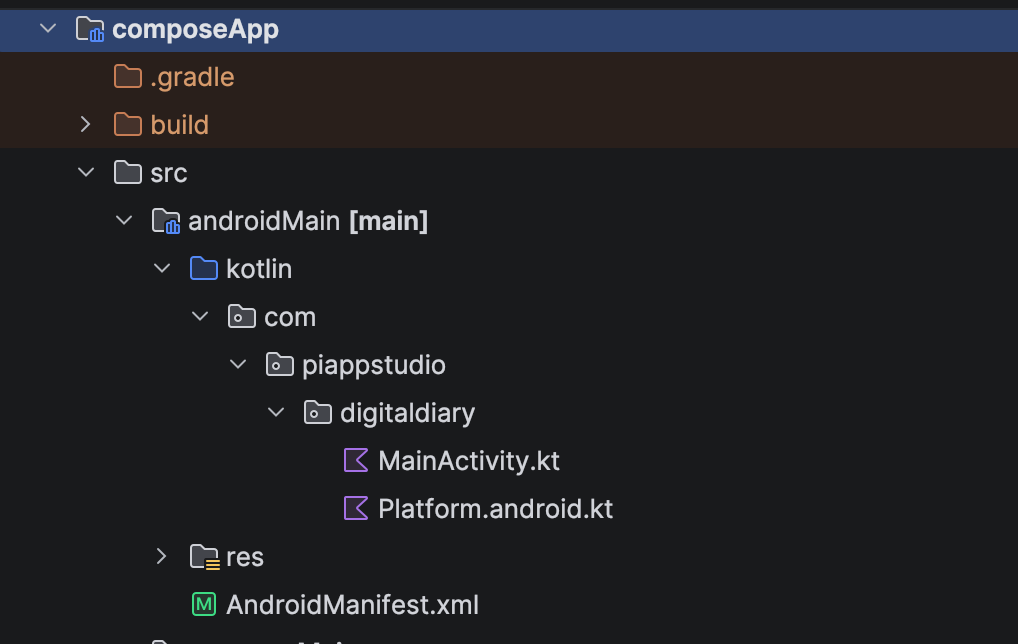
I’ve used Android Studio Panda 1 to create a Kotlin Multimodule app, which doesn’t have separate module for android
OLD Folder Strcuture
New Folder Structure:
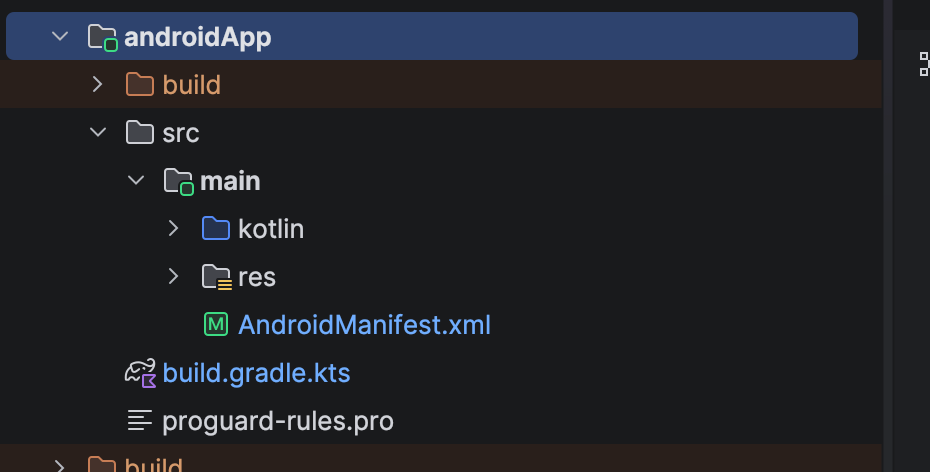
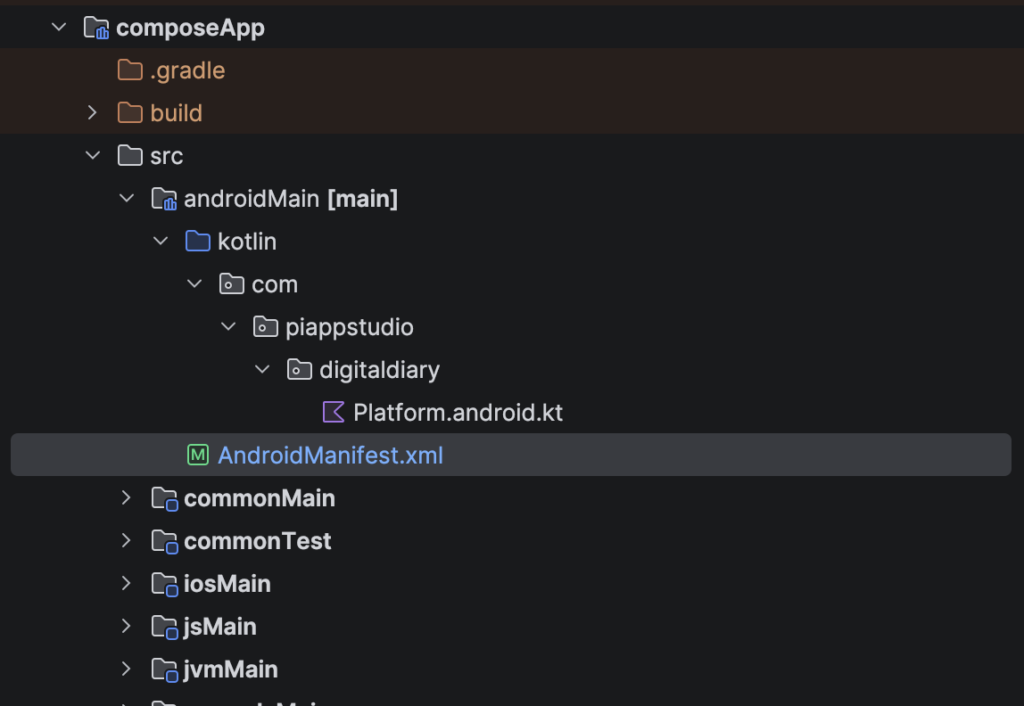
Steps to create androidApp folder
- Create new ‘androidApp/src’ folder and move all the files and folders available in composeApp/src/androidMain to androidApp/src/main except Platform.android.kt file
- composeApp/src/androidMain/AndroidManifest.xml to empty like below as we move out MainActivity and app code to different folder
<?xml version="1.0" encoding="utf-8"?>
<manifest>
</manifest>
3. Update gradle files (Please refer this patch file and make the chances accordingly)
Now worries, if you don’t know how to read this files. Here (-) inidicates removed lines (+) indicate added lines.
===================================================================
diff --git a/composeApp/build.gradle.kts b/composeApp/build.gradle.kts
--- a/composeApp/build.gradle.kts	(revision 5e06b291e9ef02c2756175a0e63e9bbcf9d30b4d)
+++ b/composeApp/build.gradle.kts	(date 1770332337088)
@@ -1,11 +1,10 @@
// Removed this import, if exit
-import org.gradle.kotlin.dsl.implementation

 plugins {
     alias(libs.plugins.kotlinMultiplatform)
     // Convert android applicaiton to android library
-    alias(libs.plugins.androidApplication)
+    alias(libs.plugins.androidLibrary)
     alias(libs.plugins.composeMultiplatform)
     alias(libs.plugins.composeCompiler)
     alias(libs.plugins.composeHotReload)
@@ -69,26 +68,8 @@
 }

 android {
-    namespace = "com.piappstudio.digitaldiary"
+    namespace = "com.piappstudio.digitaldiary.shared"
     compileSdk = libs.versions.android.compileSdk.get().toInt()
     // Remove this defaultConfig which is applicable only for android apps. LIbrary doens't needs it.
-
-    defaultConfig {
-        applicationId = "com.piappstudio.digitaldiary"
-        minSdk = libs.versions.android.minSdk.get().toInt()
-        targetSdk = libs.versions.android.targetSdk.get().toInt()
-        versionCode = 1
-        versionName = "1.0"
-    }
-    packaging {
-        resources {
-            excludes += "/META-INF/{AL2.0,LGPL2.1}"
-        }
-    }
-    buildTypes {
-        getByName("release") {
-            isMinifyEnabled = false
-        }
-    }
     compileOptions {
         sourceCompatibility = JavaVersion.VERSION_11
         targetCompatibility = JavaVersion.VERSION_11
Index: settings.gradle.kts
IDEA additional info:
Subsystem: com.intellij.openapi.diff.impl.patch.CharsetEP
<+>UTF-8
===================================================================
diff --git a/settings.gradle.kts b/settings.gradle.kts
// Very important, we telling the to consider and complile our new folder structure.
+include(":androidApp")
====
4. Add new build.gradle.kts & proguards-rules.pro in androidApp folder
plugins {
    alias(libs.plugins.kotlinMultiplatform)
    alias(libs.plugins.androidApplication)
    alias(libs.plugins.composeMultiplatform)
    alias(libs.plugins.composeCompiler)

}

kotlin {
    androidTarget()
    sourceSets {
        val androidMain by getting {
            dependencies {
                implementation(project(":composeApp"))

                implementation(libs.compose.uiToolingPreview)
                implementation(libs.androidx.activity.compose)

            }
        }
    }
}

android {
    compileSdk = libs.versions.android.compileSdk.get().toInt()
    namespace = "com.piappstudio.digitaldiary"

    sourceSets["main"].manifest.srcFile("src/main/AndroidManifest.xml")

    defaultConfig {
        applicationId = "com.piappstudio.digitaldiary"
        minSdk = libs.versions.android.minSdk.get().toInt()
        targetSdk = libs.versions.android.targetSdk.get().toInt()
        versionCode = 66
        versionName = "2.0"
    }
    compileOptions {
        sourceCompatibility = JavaVersion.VERSION_17
        targetCompatibility = JavaVersion.VERSION_17
    }
    kotlin {
        jvmToolchain(17)
    }
    buildTypes {
        debug {
            proguardFiles(getDefaultProguardFile("proguard-android-optimize.txt"), "proguard-rules.pro")
        }
        release {
            isMinifyEnabled = true
            proguardFiles(getDefaultProguardFile("proguard-android-optimize.txt"), "proguard-rules.pro")
        }
    }
}
dependencies {
    implementation(project(":composeApp"))
}
Now, let’s compile and run the android project to make sure it is woring as expected before proceed further
Warning.
Supporting builtInKotlin when android.builtInKotlin=false
libs.versions.toml
/gradle/libs.versions.toml

[plugins]
jetbrainKotlinAndroid = { id = "org.jetbrains.kotlin.android", version.ref = "kotlin" }
androidKotlinMultiplatformLibrary = { id = "com.android.kotlin.multiplatform.library", version.ref = "agp" }
Update androidApp/build.gradle.kts
File: androidApp/build.gradle.kts

import org.jetbrains.kotlin.gradle.dsl.JvmTarget

plugins {
    alias(libs.plugins.jetbrainKotlinAndroid)
    alias(libs.plugins.androidApplication)
    alias(libs.plugins.composeMultiplatform)
    alias(libs.plugins.composeCompiler)

}

kotlin {
    target {
        compilerOptions {
            jvmTarget.set(JvmTarget.JVM_11)
        }
    }
    dependencies {

        implementation(project(":composeApp"))

        implementation(libs.compose.uiToolingPreview)
        implementation(libs.androidx.activity.compose)


    }

    android {
        compileSdk = libs.versions.android.compileSdk.get().toInt()
        namespace = "com.piappstudio.digitaldiary"

        defaultConfig {
            applicationId = "com.piappstudio.digitaldiary"
            minSdk = libs.versions.android.minSdk.get().toInt()
            targetSdk = libs.versions.android.targetSdk.get().toInt()
            versionCode = 66
            versionName = "2.0"
        }
        packaging {
            resources {
                excludes += "/META-INF/{AL2.0,LGPL2.1}"
            }
        }

        buildTypes {
            debug {
                proguardFiles(getDefaultProguardFile("proguard-android-optimize.txt"), "proguard-rules.pro")
            }
            release {
                isMinifyEnabled = true
                proguardFiles(getDefaultProguardFile("proguard-android-optimize.txt"), "proguard-rules.pro")
            }
        }
    }
}
Update project’s root build.gradle.kts
FileName: build.gradle.kts
+    alias(libs.plugins.jetbrainKotlinAndroid) apply false
Update composeApp/build.gradle.kts
Index: composeApp/build.gradle.kts
IDEA additional info:
Subsystem: com.intellij.openapi.diff.impl.patch.CharsetEP
<+>UTF-8
===================================================================
diff --git a/composeApp/build.gradle.kts b/composeApp/build.gradle.kts
--- a/composeApp/build.gradle.kts	(revision 3f58f97d7de729adf13dd7c3086a06dc83ddb371)
+++ b/composeApp/build.gradle.kts	(date 1770341071189)
@@ -4,19 +4,14 @@

 plugins {
     alias(libs.plugins.kotlinMultiplatform)
-    alias(libs.plugins.androidLibrary)
+    alias(libs.plugins.androidKotlinMultiplatformLibrary)
     alias(libs.plugins.composeMultiplatform)
     alias(libs.plugins.composeCompiler)
     alias(libs.plugins.composeHotReload)
 }

 kotlin {
-    androidTarget {
-        compilerOptions {
-            jvmTarget.set(JvmTarget.JVM_11)
-        }
-    }
-
+
     listOf(
         iosArm64(),
         iosSimulatorArm64()
@@ -65,19 +60,23 @@
             implementation(libs.kotlinx.coroutinesSwing)
         }
     }
-}

-android {
-    namespace = "com.piappstudio.digitaldiary.shared"
-    compileSdk = libs.versions.android.compileSdk.get().toInt()
-    compileOptions {
-        sourceCompatibility = JavaVersion.VERSION_11
-        targetCompatibility = JavaVersion.VERSION_11
+    androidLibrary {
+        namespace = "com.piappstudio.digitaldiary.shard"
+        compileSdk = libs.versions.android.compileSdk.get().toInt()
+        compilerOptions {
+            jvmTarget.set(JvmTarget.JVM_11)
+        }
+
+        androidResources {
+            enable = true
+        }
+
     }
 }

 dependencies {
-    debugImplementation(libs.compose.uiTooling)
+    androidRuntimeClasspath(libs.compose.uiTooling)
 }
Compile, and run the project and make sure everything works fine before touching the final nerves
Step 3 Removing Gradle 9.0.0 properties & Enabling newDSL & buildInKotlin
Now, make minor trick in androidApp/build.gradle.kts. Here, we are rolling back the changes we made for “org.jetbrains.kotlin.android” , which is not required when newDSL=true. Refer below .patch file for more details.
Subject: [PATCH] Refactor project structure and update build configurations

Index: androidApp/build.gradle.kts
IDEA additional info:
Subsystem: com.intellij.openapi.diff.impl.patch.CharsetEP
<+>UTF-8
===================================================================
diff --git a/androidApp/build.gradle.kts b/androidApp/build.gradle.kts
--- a/androidApp/build.gradle.kts	(revision 70e52030549ff480ed9f0a36cf2860803bb5e8a0)
+++ b/androidApp/build.gradle.kts	(date 1770343677440)
@@ -3,7 +3,6 @@
 // https://github.com/kotlin-hands-on/get-started-with-cm/blob/main/gradle/libs.versions.toml
 //https://github.com/kotlin-hands-on/get-started-with-cm/tree/new-project-structure
 plugins {
-    alias(libs.plugins.jetbrainKotlinAndroid)
     alias(libs.plugins.androidApplication)
     alias(libs.plugins.composeMultiplatform)
     alias(libs.plugins.composeCompiler)
@@ -21,7 +20,7 @@
     }
     dependencies {

-        implementation(project(":composeApp"))
+        implementation(projects.composeApp)

         implementation(libs.compose.uiToolingPreview)
         implementation(libs.androidx.activity.compose)
Index: gradle/libs.versions.toml
IDEA additional info:
Subsystem: com.intellij.openapi.diff.impl.patch.CharsetEP
<+>UTF-8
===================================================================
diff --git a/gradle/libs.versions.toml b/gradle/libs.versions.toml
--- a/gradle/libs.versions.toml	(revision 70e52030549ff480ed9f0a36cf2860803bb5e8a0)
+++ b/gradle/libs.versions.toml	(date 1770344246486)
@@ -51,7 +51,6 @@

 androidApplication = { id = "com.android.application", version.ref = "agp" }
 androidLibrary = { id = "com.android.library", version.ref = "agp" }
-jetbrainKotlinAndroid = { id = "org.jetbrains.kotlin.android", version.ref = "kotlin" }
 composeHotReload = { id = "org.jetbrains.compose.hot-reload", version.ref = "composeHotReload" }
 composeMultiplatform = { id = "org.jetbrains.compose", version.ref = "composeMultiplatform" }
 composeCompiler = { id = "org.jetbrains.kotlin.plugin.compose", version.ref = "kotlin" }
Index: build.gradle.kts
IDEA additional info:
Subsystem: com.intellij.openapi.diff.impl.patch.CharsetEP
<+>UTF-8
===================================================================
diff --git a/build.gradle.kts b/build.gradle.kts
--- a/build.gradle.kts	(revision 70e52030549ff480ed9f0a36cf2860803bb5e8a0)
+++ b/build.gradle.kts	(date 1770344252515)
@@ -9,6 +9,4 @@
     alias(libs.plugins.kotlinMultiplatform) apply false
     alias(libs.plugins.androidKotlinMultiplatformLibrary) apply false
     alias(libs.plugins.androidLint) apply false
-    alias(libs.plugins.jetbrainKotlinAndroid) apply false
-
 }
\ No newline at end of file
Index: gradle.properties
IDEA additional info:
Subsystem: com.intellij.openapi.diff.impl.patch.CharsetEP
<+>ISO-8859-1
===================================================================
diff --git a/gradle.properties b/gradle.properties
--- a/gradle.properties	(revision 70e52030549ff480ed9f0a36cf2860803bb5e8a0)
+++ b/gradle.properties	(date 1770343722733)
@@ -9,14 +9,4 @@

 #Android
 android.nonTransitiveRClass=true
-android.builtInKotlin=false
-android.newDsl=false
\ No newline at end of file
+android.useAndroidX=true
\ No newline at end of file
That’s it. Now, you fully migrated to latest Android Gradle Plugin 9.0.0. 🔥🔥🔥
Reference:
https://kotlinlang.org/docs/multiplatform/multiplatform-project-agp-9-migration.html
Old Project Repo: https://github.com/kotlin-hands-on/get-started-with-cm/tree/main
New Project Repo: https://github.com/kotlin-hands-on/get-started-with-cm/tree/new-project-structure