
In this tutorial, we will walk through how to implement in-app subscriptions in a Kotlin Multiplatform Mobile (KMM) project, supporting both Android and iOS platforms using Google Play Billing 7.1.1 and StoreKit respectively.
✨ What We’ll Build
- Unified subscription handling using KMM’s
expect/actualpattern. - Billing implementation for Android using Google Play Billing 7.1.1.
- Billing implementation for iOS using StoreKit and
SKPaymentQueue. - A shared interface to check whether the user has an active subscription.
Youtube Video
Enable Subscriptions in Google Play Store (Play Console)
To offer subscriptions in an Android app, you’ll need to configure them in Google Play Console.
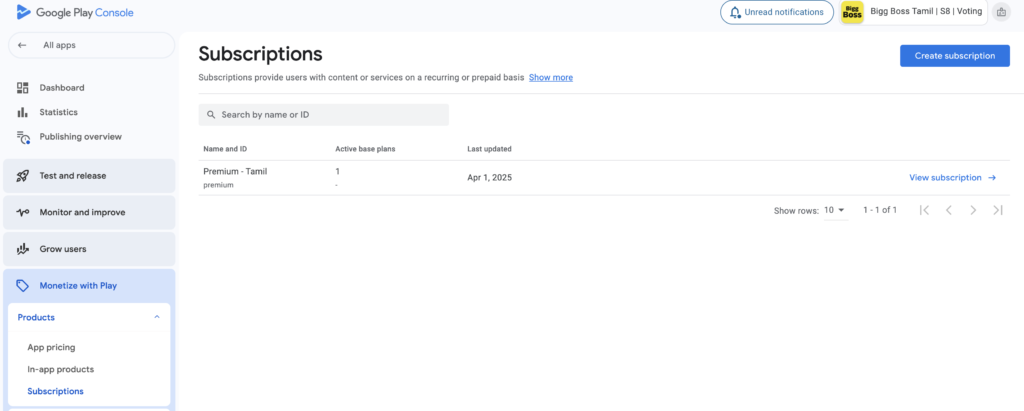
✅ Step 1: Set Up a Google Play Console Account
- Go to Google Play Console
- Sign in with your developer account.
- If you’re new, pay the $25 one-time registration fee and set up your developer profile.
✅ Step 2: Upload Your App (If Not Done Already)
- Create a new app: click “Create app”.
- Fill out required info like app name, language, and category.
- Upload an APK or AAB (Android App Bundle).
Subscriptions require the app to be uploaded or at least have a draft before setup.
✅ Step 3: Go to “Monetize > Products > Subscriptions”
- In the left-hand menu, navigate to:
Monetize → Products → Subscriptions - Click “Create subscription”
✅ Step 4: Define Your Subscription
You’ll need to fill in:
- Product ID (unique identifier, like
premium_monthly) - Subscription name & description
- Base plan(s): Define billing period (weekly, monthly, yearly), price, free trial, etc.
- Optionally add offers (intro pricing, custom plans, etc.)
Enable Subscriptions in Apple App Store (App Store Connect)
To offer subscriptions on iOS, you’ll use App Store Connect.
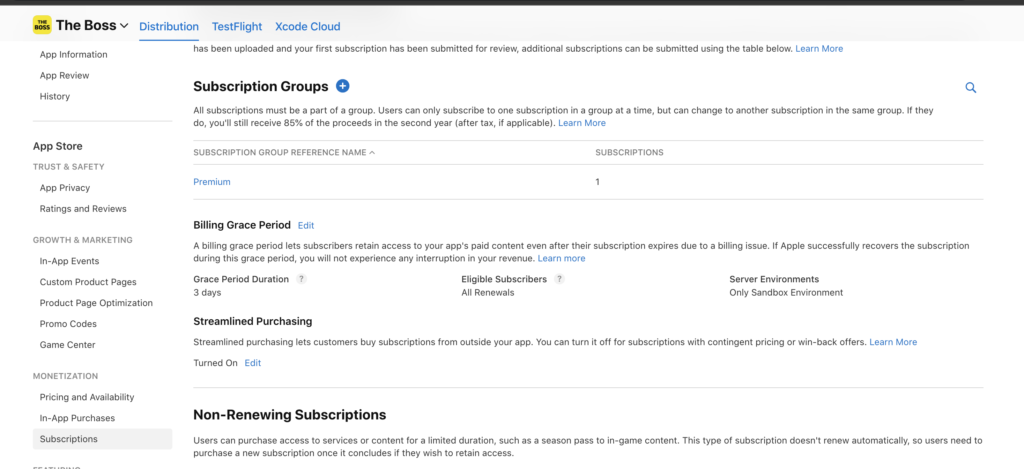
✅ Step 1: Enroll in the Apple Developer Program
- Go to Apple Developer Program
- Sign up and pay the $99 annual fee
- Use the same Apple ID for App Store Connect
✅ Step 2: Create Your App in App Store Connect
- Log in at App Store Connect
- Click My Apps → + to create a new app
- Fill out your app info (name, bundle ID, etc.)
✅ Step 3: Set Up In-App Purchases
- Go to your app > Monetization > Subscriptions
- Click “+” and start adding subscription group
✅ Step 4: Define Your Subscription Group
Subscriptions need to be part of a subscription group:
- Add a new group (e.g. “Pro Plans”)
- Inside the group, add your subscription(s) — like monthly, yearly, etc.
✅ Step 5: Configure Subscription Details
For each subscription:
- Reference name (internal)
- Product ID (unique, like
pro_monthly) - Duration (weekly, monthly, yearly)
- Price (based on App Store pricing tiers)
- Optional: Free trial or intro offer
⚠️ Apple requires all subscriptions to have a localized display name & description.
Define Shared Expect Class (commonMain)
expect class SubscriptionManager() {
    fun purchaseSubscription(callback: (Boolean) -> Unit)
    fun isUserSubscribed(callback: (Boolean) -> Unit)
    fun manageSubscription()
}
Android Implementation (androidMain)
Dependencies (build.gradle.kts)
dependencies { implementation("com.android.billingclient:billing-ktx:7.1.1")} BillingHelper for Android
Kotlin helper class to handle android native subscrptions mechanism using android.billingclient api
BillingHelper.kt
package iap

import android.app.Activity
import android.content.Context
import android.util.Log
import com.android.billingclient.api.AcknowledgePurchaseParams
import com.android.billingclient.api.BillingClient
import com.android.billingclient.api.BillingClientStateListener
import com.android.billingclient.api.BillingFlowParams
import com.android.billingclient.api.BillingResult
import com.android.billingclient.api.PendingPurchasesParams
import com.android.billingclient.api.Purchase
import com.android.billingclient.api.QueryProductDetailsParams
import com.android.billingclient.api.QueryPurchasesParams

class BillingHelper(private val context: Context) {

    val BIGG_BOSS_PREMIUM ="premium_subscription"
    val TAG = BillingHelper::class.simpleName
    var purchaseCallback:((isSuccess:Boolean)->Unit)? = null

    var params: PendingPurchasesParams = PendingPurchasesParams.newBuilder()
        .enableOneTimeProducts()
        .enablePrepaidPlans()
        .build()

    private var billingClient: BillingClient

    init {
        billingClient = BillingClient.newBuilder(context)
            .enablePendingPurchases(params)
            .setListener { billingResult, purchases ->
                Log.d("enablePendingPurchases", "BillingClient creation result : ${billingResult.responseCode}")
                if (billingResult.responseCode == BillingClient.BillingResponseCode.OK && purchases != null) {
                    handlePurchase(purchases)
                }
            }.build()
    }

    private fun connectPlayStore(callback: (isConnected:Boolean) -> Unit) {
        if (billingClient.isReady) {
            callback.invoke(true)
        } else {
            billingClient.startConnection(object : BillingClientStateListener {
                override fun onBillingSetupFinished(billingResult: BillingResult) {
                    Log.d(TAG, "startConnection onBillingSetupFinished")
                    if (billingResult.responseCode == BillingClient.BillingResponseCode.OK) {
                        // BillingClient is ready
                        Log.d(TAG, "BillingClient is ready")
                        callback.invoke(true)
                    }
                }

                override fun onBillingServiceDisconnected() {
                    Log.d(TAG, "startConnection onBillingServiceDisconnected")
                }
            })
        }
    }

    fun checkSubscriptionStatus(callback: (Boolean) -> Unit) {
        Log.d(TAG, "checkSubscriptionStatus")
        connectPlayStore {
            val params = QueryPurchasesParams.newBuilder()
                .setProductType(BillingClient.ProductType.SUBS)
                .build()

            billingClient.queryPurchasesAsync(params) { billingResult, purchases ->
                Log.d(TAG, "queryPurchasesAsync callback: ${billingResult.responseCode}, ${purchases.size}")
                if (billingResult.responseCode == BillingClient.BillingResponseCode.OK) {
                    val isSubscribed = purchases.any { it.products.contains(BIGG_BOSS_PREMIUM) }
                    callback(isSubscribed)
                } else {
                    callback(false)
                }
            }
        }

    }

    fun purchaseSubscription(activity: Activity, callback: (Boolean) -> Unit) {
        val params = QueryProductDetailsParams.newBuilder()
            .setProductList(
                listOf(
                    QueryProductDetailsParams.Product.newBuilder()
                        .setProductId(BIGG_BOSS_PREMIUM)
                        .setProductType(BillingClient.ProductType.SUBS)
                        .build()
                )
            )
            .build()

        billingClient.queryProductDetailsAsync(params) { billingResult, productDetailsList ->
            if (billingResult.responseCode == BillingClient.BillingResponseCode.OK && productDetailsList.isNotEmpty()) {
                val productDetails = productDetailsList.first()
                val offerToken = productDetails.subscriptionOfferDetails?.first()?.offerToken
                    ?: return@queryProductDetailsAsync

                val billingParams = BillingFlowParams.newBuilder()
                    .setProductDetailsParamsList(
                        listOf(
                            BillingFlowParams.ProductDetailsParams.newBuilder()
                                .setProductDetails(productDetails)
                                .setOfferToken(offerToken)
                                .build()
                        )
                    )
                    .build()

                purchaseCallback = callback
                billingClient.launchBillingFlow(activity, billingParams)
            }
        }
    }

    private fun handlePurchase(purchases: List<Purchase>) {
        for (purchase in purchases) {
            if (purchase.purchaseState == Purchase.PurchaseState.PURCHASED) {
                // Grant subscription benefits
                Log.d("BillingManager", "Subscription is active: ${purchase.products}")
                acknowledgePurchase(purchase)
                purchaseCallback?.invoke(true)
                purchaseCallback = null
            }
        }
    }

    private fun acknowledgePurchase(purchase: Purchase) {
        if (!purchase.isAcknowledged) {
            val params = AcknowledgePurchaseParams.newBuilder()
                .setPurchaseToken(purchase.purchaseToken)
                .build()

            billingClient.acknowledgePurchase(params) { billingResult ->
                if (billingResult.responseCode == BillingClient.BillingResponseCode.OK) {
                    Log.d("BillingManager", "Purchase acknowledged")
                }
            }
        }
    }

}
Integrate helper class with SubscriptionManager for Android (shared)
SubscriptionManager.android.kt
package iap

import android.app.Activity
import ui.native.LinkLauncher
import ui.native.PiShared

actual class SubscriptionManager {

    private val billingHelper = BillingHelper(PiShared.applicationContext!!)
    actual fun purchaseSubscription(callback: (Boolean) -> Unit) {
        (PiShared.applicationContext as? Activity)?.let {
            billingHelper.purchaseSubscription(it, callback)
        }
    }
    actual fun isUserSubscribed(callback: (Boolean) -> Unit) {
        billingHelper.checkSubscriptionStatus (callback)
    }

    actual fun manageSubscription() {
        LinkLauncher().openLink("https://play.google.com/store/account/subscriptions")
    }

}
3. iOS Implementation (iOSApp)
Swift code that handle iOS native implementation for Subscription handling. Add SubscriptionManager.swift in the following folder
iosApp/iOSApp/Subscription
//
//  SubscriptionManager.swift
//  iosApp
//
//  Created by Apple on 4/2/25.
//  Copyright © 2025 orgName. All rights reserved.
//

import Foundation
import StoreKit

@objc public class SubscriptionManager: NSObject, SKProductsRequestDelegate, SKPaymentTransactionObserver {
    let PRODUCT_ID = "ios_subscription"
    @objc public static let shared = SubscriptionManager()
    var products: [SKProduct] = []

    var purchaseCallBack:((Bool)->Void)? = nil

    override init() {
        super.init()
        SKPaymentQueue.default().add(self)
    }

    @objc public func fetchSubscriptions() {
        let request = SKProductsRequest(productIdentifiers: [PRODUCT_ID])
        request.delegate = self
        request.start()
    }

    public func productsRequest(_ request: SKProductsRequest, didReceive response: SKProductsResponse) {
        self.products = response.products
        print("productsRequest is called: \(self.products)")
        for product in products {
            print(product.productIdentifier)
        }
    }

    @objc public func purchaseSubscription(productId: String, callback:(@escaping (Bool)-> Void)) {

        guard let product = products.first(where: { $0.productIdentifier == productId }) else { return }
        let payment = SKPayment(product: product)
        purchaseCallBack = callback
        SKPaymentQueue.default().add(payment)
    }

    @objc public func paymentQueue(_ queue: SKPaymentQueue, updatedTransactions transactions: [SKPaymentTransaction]) {
        for transaction in transactions {
            switch transaction.transactionState {
            case .purchased:
                unlockContent(productId: transaction.payment.productIdentifier)

                SKPaymentQueue.default().finishTransaction(transaction)
            case .failed:
                SKPaymentQueue.default().finishTransaction(transaction)
            default:
                break
            }
        }
    }

    private func unlockContent(productId: String) {
        purchaseCallBack?(true)
        UserDefaults.standard.set(true, forKey: productId)
    }

    @objc public func isSubscribed(productId: String) -> Bool {
        return UserDefaults.standard.bool(forKey: productId)
    }
}
Expose swift code to Kotlin using swift-klib
Swift-Klib gradle plugin provides easy way to include your Swift source files in your Kotlin Multiplatform Mobile shared module and access them in Kotlin via cinterop for iOS targets. https://github.com/ttypic/swift-klib-plugin
Update libs.version.toml
[version]
swift-klib = "0.6.4"
[plugins]
swift-klib = { id = "io.github.ttypic.swiftklib", version.ref = "swift-klib"}
Update KMM “shared/build.gradle.kts”
plugins {
    alias(libs.plugins.swift.klib)

}

kotlin {

  listOf(
        iosX64(),
        iosArm64(),
        iosSimulatorArm64()
    ).forEach { iosTarget ->
        iosTarget.compilations {
            val main by getting {
                cinterops {
                    create("Subscription")
                }
            }
        }
    }
}

// ../iosApp/iosApp/Subscription is folder path where Subscription.swift

swiftklib {
    create("Subscription") {
        path = file("../iosApp/iosApp/Subscription")
         // Kotlin package name
        packageName("com.piappstudio.swift.subscription")
    }
}
iOS Implementation (shared/iOSMain)
Let’s access Swift function from Kotlin
SubscriptionManager.ios.kt
package iap
import co.touchlab.kermit.Logger
import com.piappstudio.swift.subscription.SubscriptionManager
import kotlinx.cinterop.ExperimentalForeignApi
import model.PiGlobalInfo
import ui.native.LinkLauncher

@OptIn(ExperimentalForeignApi::class)
actual class SubscriptionManager  {

    val productId = "tamil"
     var subscriptionManager: SubscriptionManager = SubscriptionManager.shared()

    init {
        subscriptionManager.fetchSubscriptions()
    }

    actual fun purchaseSubscription(callback: (Boolean) -> Unit) {
        Logger.d(tag = "SubscriptionManager", messageString = "purchaseSubscription")
        subscriptionManager.purchaseSubscriptionWithProductId(productId, callback = callback)
    }

    @OptIn(ExperimentalForeignApi::class)
    actual fun isUserSubscribed(callback: (Boolean) -> Unit) {
        Logger.d("isUserSubscribed")
        val isSubscribed = subscriptionManager.isSubscribedWithProductId(productId)
        Logger.d(tag = "SubscriptionManager",  messageString = "isSubscribed: $isSubscribed")
        callback.invoke(isSubscribed)
    }

    actual fun manageSubscription() {
        LinkLauncher().openLink("https://apps.apple.com/account/subscriptions")
    }

}
4. Usage in Shared Code
private fun checkSubscription() {
    screenModelScope.launch (Dispatchers.IO)  {
        subscriptionManager.isUserSubscribed { isPremiumUser ->
            Logger.d("Subscription Manager: $isPremiumUser")
            val premiumStatus = if (isPremiumUser) PremiumStatus.Subscribed else PremiumStatus.UnSubscribed
            piGlobalUtil.updateAppState(piGlobalUtil.appState.value.copy(premiumStatus = premiumStatus))
        }
    }
}

// To add button for subscription
Button(onClick = {
                subscriptionManager.purchaseSubscription(callback)
            },
                modifier = Modifier.fillMaxWidth(), colors = ButtonDefaults.buttonColors().copy(containerColor = PiColor.goldStar,
                    contentColor = MaterialTheme.colorScheme.onSurface)
            ) {
                Text(
                    "GO PREMIUM FOR $0.99 / YEAR",
                    fontWeight = FontWeight.ExtraBold,
                    modifier = Modifier.padding(Dimens.space)
                )
            })

// To display "Manage Subscription " option
Button(onClick = {
                subscriptionManager.manageSubscription()
            },
                modifier = Modifier.fillMaxWidth(), colors = ButtonDefaults.buttonColors().copy(containerColor = PiColor.goldStar,
                    contentColor = MaterialTheme.colorScheme.onSurface)
            ) {
                Text(
                    "Manage Subscription",
                    fontWeight = FontWeight.ExtraBold,
                    modifier = Modifier.padding(Dimens.space)
                )
            })
🚀 Summary
Now you have:
- A complete subscription flow for both Android and iOS in KMM.
- Observer integration for iOS via
StoreObserver. - Google Play Billing integration via version 7.1.1.
Want to add restore purchase support or server-side receipt validation? Drop a comment or request a follow-up!
Happy coding ✨
Pingback: Kotlin Multiplatform (KMM) Subscriptions: How to Implement In-App Subscriptions for Android and iOS | by Boobalan Munusamy | Apr, 2025 - Techcaro.com